Online stores with WebChat
All news in a familiar environment
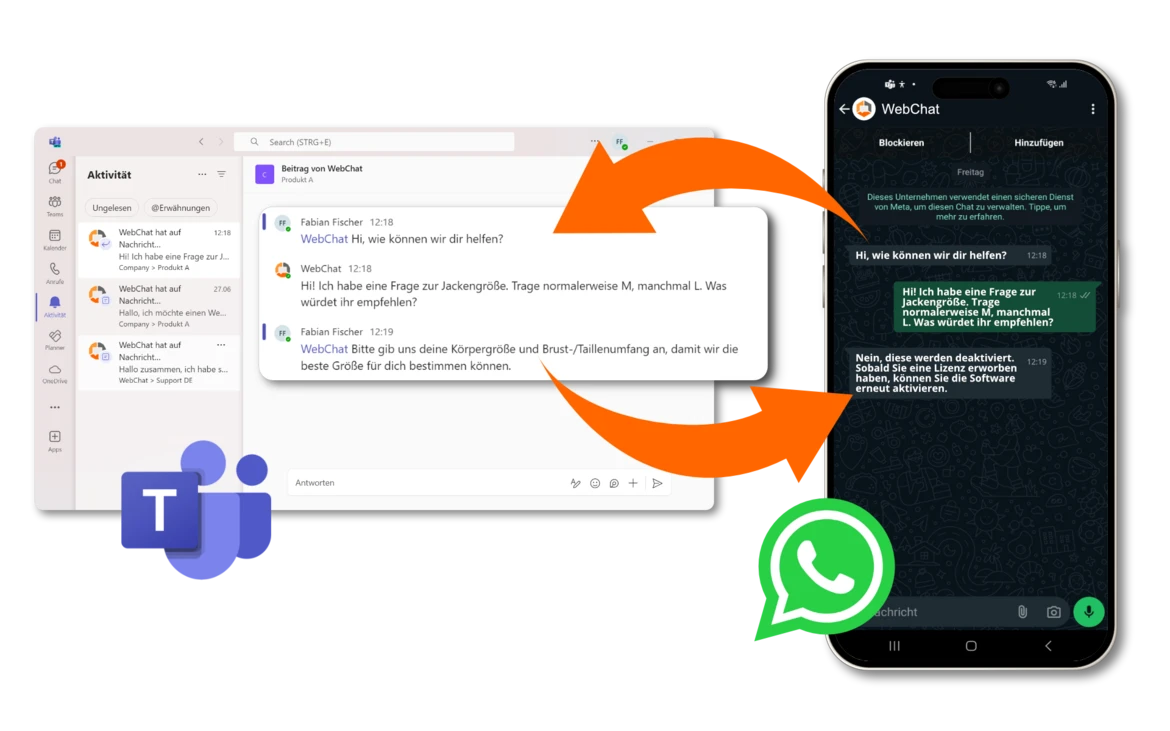
Receive messages from WhatsApp Business and your chat widget directly in Microsoft Teams - with WebChat!
Optimize your customer service and communication - With the WebChat solution, you can receive and manage all messages from WhatsApp Business and a chat widget directly in Microsoft Teams. Offer your customers a fast, professional service and simplify communication within your team!
Why WebChat is the perfect solution for your communication
In a world where customer service and fast communication make the difference, WebChat enables the seamless integration of WhatsApp Business and a chat widget on your landing page. All incoming messages land directly in Microsoft Teams, so your team can respond quickly and efficiently - all in one central location!

Advantages of WebChat integration with Microsoft Teams
1. centralized communication in Microsoft Teams
WebChat gives you a central point of contact for all customer inquiries. Whether via WhatsApp Business or your chat widget on the website - all messages are transmitted directly in Microsoft Teams. No more need to switch back and forth between different tools! Use Microsoft Teams to respond immediately and efficiently to requests and maximize customer satisfaction.
2. optimized customer service through real-time communication
Thanks to the WebChat integration with WhatsApp Business and the chat widget, you can communicate with your customers in real time. By connecting directly to Microsoft Teams, your team members receive instant notifications and can respond immediately without having to use additional software or tools. Maximize the efficiency of your customer service and answer questions faster than ever before.
3. flexibility and easy management
Conveniently manage all incoming messages from WhatsApp and your chat widget in a single, user-friendly interface. With direct integration into Microsoft Teams, you can stay on top of things and respond quickly to customer inquiries - whether you're in the office or on the go. WebChat allows your team to work in a familiar environment and optimize communication without delays.
4. seamless integration into your existing Microsoft Teams environment
Integrating WebChat into Microsoft Teams is easy and does not require extensive technical setup. All you need is a Microsoft Teams account and the WebChat integration. All incoming messages from WhatsApp Business or your chat widget will then appear directly in Teams channels or as notifications, so your team can respond immediately.
5. increased efficiency and faster response times
By automating and integrating WebChat with Microsoft Teams, your response times are drastically reduced. Team members are notified immediately and can respond to requests directly via Microsoft Teams. This leads to better customer satisfaction and greater efficiency in processing messages.
6. everything in one place - no switching between different tools
With the WebChat integration, you no longer have to move back and forth between multiple communication channels. All messages from WhatsApp Business and the chat widget on your landing page end up directly in Microsoft Teams, where you can manage everything centrally. Simple, fast and without chaos!


Why Microsoft Teams?
- Central platform: Microsoft Teams is one of the best-known and most frequently used communication platforms. With integration into WebChat, you have all customer conversations in one place.
- Simple and effective: Teams is easy to use, so your team can respond quickly to messages without additional effort.
- Collaboration and teamwork: Use Microsoft Teams to collaborate quickly and effectively as a team and process customer inquiries.
Start now: Optimize your customer service with WebChat and Microsoft Teams
Take advantage of the WebChat solution and the integration with WhatsApp Business and the chat widget on your landing page to receive all messages directly in Microsoft Teams. Increase your efficiency, improve customer satisfaction and reduce response times - all in a single, user-friendly platform.
Frequently Asked Questions (FAQ)
How does the integration of WebChat with WhatsApp Business and Microsoft Teams work?
Integrating WebChat with WhatsApp Business and Microsoft Teams is easy. You connect all channels in just a few steps and all incoming messages appear directly in Microsoft Teams.
Do I need special software to use WebChat?
No, you only need a Microsoft Teams account and a WebChat license. The integration takes place without any additional software installation.
Can we see all messages in Teams at the same time?
Yes, all messages from WhatsApp Business and the chat widget appear directly in Microsoft Teams so that your team can respond immediately.

1. installation

2. configure
